
Best Roblox Launcher Alternatives in 2026
Roblox players often search for launcher alternatives to gain more control over performance, customization, FastFlags, multi-instance support, and quality-of-life features that are not available in the default Roblox launcher.
Over the last few years, several third-party launchers have emerged, including Bloxstrap, Fishstrap, LucyStrap, and newer projects such as Voidstrap customized launcher. While all of these launchers aim to improve the Roblox experience, they differ significantly in usability, features, update management, and performance tools
Evaluation Criteria
To create this comparison, we evaluated each launcher using the following criteria:
- FastFlag management
- Performance optimization tools
- Ease of use
- Multi-instance support
- Customizability
- Update control
- Community adoption
- Active development
- User experience
Rather than focusing on a single feature, we considered the overall experience most Roblox players are likely to have.
Quick Overview
| Launcher | Best For | Ease of Use | Features | Performance Tools | Verdict |
|---|---|---|---|---|---|
| Voidstrap | Most Roblox Players | 10/10 | 10/10 | 10/10 | Winner |
| Bloxstrap | Community & Stability | 8/10 | 8/10 | 8/10 | Runner-Up |
| Fishstrap | Advanced Users | 6/10 | 9/10 | 9/10 | Power Users |
| LucyStrap | Beginners | 8/10 | 6/10 | 7/10 | Basic Alternative |
vs Bloxstrap
Bloxstrap is one of the most well-known Roblox launchers available today. It gained popularity because it provided extensive customization options while remaining lightweight and stable.
Many users appreciate its large community, documentation, and long development history.
Strengths
- Large user base
- Reliable performance
- Extensive customization
- Mature ecosystem
Potential Drawbacks
- Some advanced configurations require manual setup
- Fewer built-in optimization presets compared to newer launchers
Final Result
Bloxstrap remains a strong choice for experienced Roblox players. It offers excellent customization and has built a trusted reputation within the community.
However, our launcher customized launcher expands upon many of these ideas by introducing additional usability features and optimization tools.
Players who want extensive control without spending time manually configuring settings may prefer Voidstrap.
Winner: Voidstrap
vs Fishstrap
Fishstrap is a feature-rich launcher focused on power users who want deeper control over Roblox behavior.
It includes extensive logging options, advanced update controls, and numerous customization capabilities.
Strengths
- Powerful configuration tools
- Advanced logging
- Extensive update control
- Strong customization options
Potential Drawbacks
- More complex setup
- Less beginner-friendly
Final Result
Fishstrap excels when maximum control is the primary goal.
However, many players never use the majority of advanced configuration options available.
it delivers many of the same benefits while maintaining a cleaner and more approachable experience.
Winner: Voidstrap
vs LucyStrap
LucyStrap focuses primarily on performance optimization and FastFlag configuration.
Its simpler design makes it appealing to users who want straightforward performance improvements.
Strengths
- Easy to install
- Simple interface
- Performance-focused
Potential Drawbacks
- Fewer advanced features
- Less flexibility than larger launchers
Final Result
Both launchers can improve the Roblox experience through FastFlag optimization.
The difference is that our bootstrapper extends beyond basic performance tweaks by providing additional launcher features, profile management, and advanced customization tools.
Winner: Voidstrap
LucyStrap works well for basic optimization, but it offers substantially more functionality. Some Roblox launchers include tools that make server selection easier. Learn how the Voidstrap server browser helps users find the best servers more efficiently.
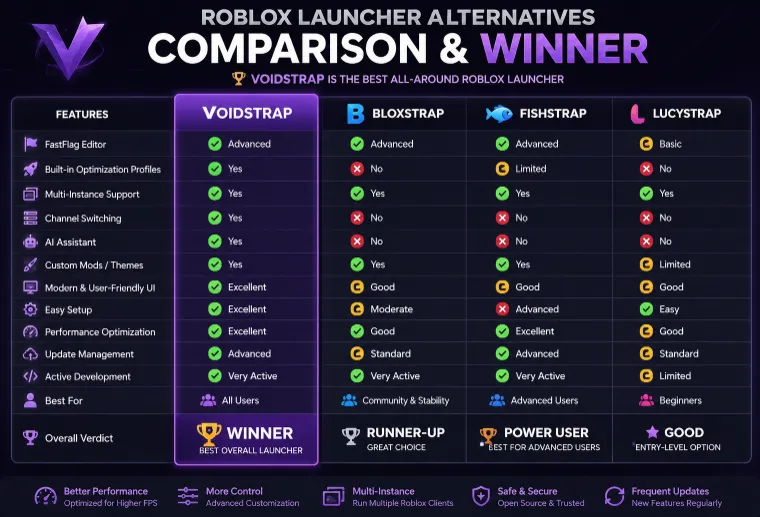
Detailed Comparison
| Feature | Voidstrap | Bloxstrap | Fishstrap | LucyStrap |
|---|---|---|---|---|
| FastFlag Editor | Advanced | Advanced | Advanced | Basic |
| Built-in Optimization Profiles | Yes | No | Limited | No |
| Multi-Instance Support | Yes | Yes | Yes | Yes |
| Channel Switching | Yes | No | No | No |
| AI Assistant | Yes | No | No | No |
| Custom Mods | Yes | Yes | Yes | Limited |
| Modern Interface | Excellent | Good | Good | Good |
| Easy Setup | Excellent | Moderate | Advanced | Easy |
| Advanced Controls | Excellent | Good | Excellent | Basic |
| Update Management | Advanced | Standard | Advanced | Standard |
| Beginner Friendly | Excellent | Moderate | Complex | Good |
| Power User Features | Excellent | Good | Excellent | Limited |
| Active Development | Yes | Yes | Yes | Limited |
| Overall Value | Winner | Runner-Up | Advanced Users | Entry Level |
Many Roblox launchers offer customization options, but cursor personalization isn’t always included. Learn how to set up and use custom cursors in Voidstrap for a more personalized experience.
Why Voidstrap Is Our Top Recommendation
Every launcher discussed in this guide has strengths.
Bloxstrap remains highly respected.
Fishstrap offers powerful advanced controls.
LucyStrap provides straightforward optimization.
However, when considering usability, customization, performance tools, FastFlag support, multi-instance launching, and overall user experience together, Voidstrap delivers the strongest balance.
For most Roblox players, it is the launcher that requires the fewest compromises.


